Limited offer · Closing in00d00h00m00s
Self-serve · one-time payment, lifetime access

GHL theme design that makes GoHighLevel look like your roofing company

A GHL Customizer account lets you re-skin your own GoHighLevel in a live editor: 27 themes, 16 animated login pages, dashboards, pipeline boards, menus and website widgets. Pay once, get the login by email, switch it on with one line of code.

Login emailed within minutes (max 24 hours)No monthly feeYour data untouched
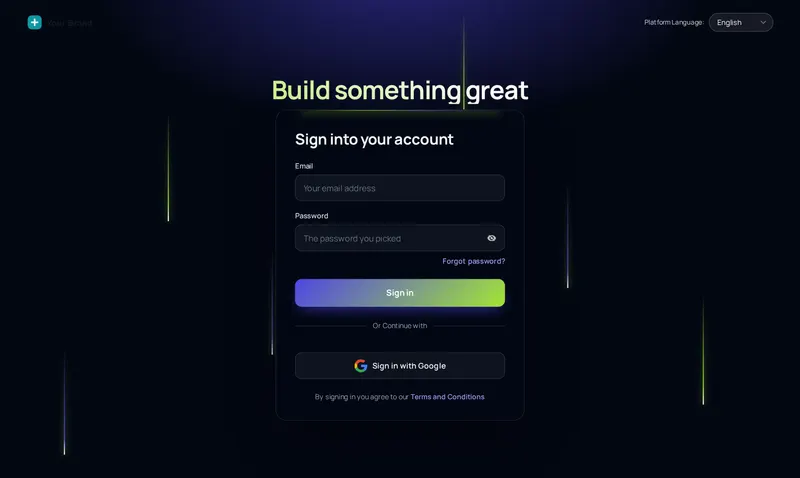
Light beams animated login page design for a roofing company GoHighLevel account
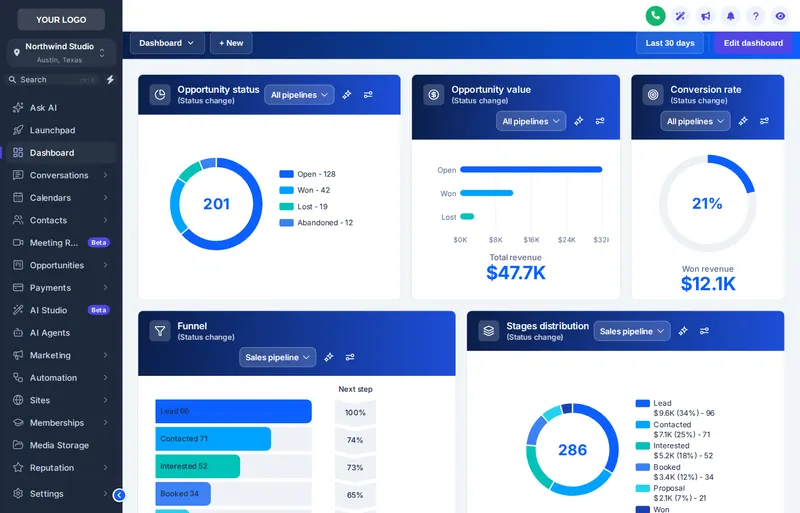
Ocean Pro dashboard design on a roofing company GoHighLevel home screen
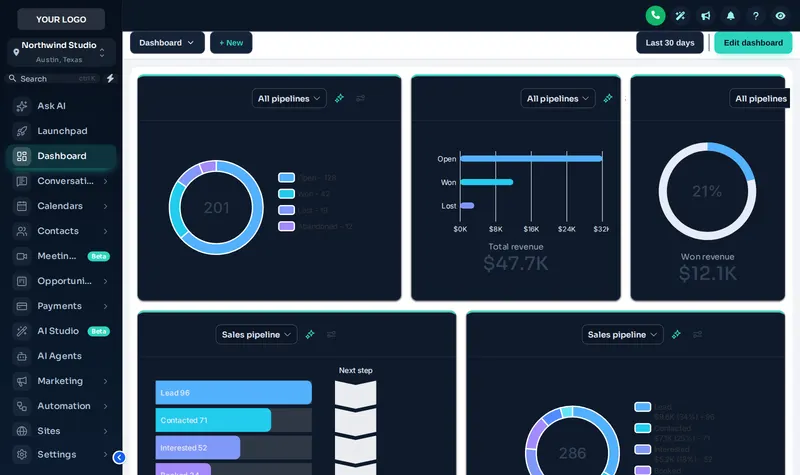
Midnight Mint GoHighLevel theme with the Accent Top UI kit on a sample roofing sub-account
Midnight Mint · Accent Top

Short answerGHL theme design is restyling the GoHighLevel interface (sidebar, colors, login page, dashboard and pipeline board) so it carries your brand instead of the stock look. A GHL Customizer account does it without custom CSS: you pick designs in a live editor and publish them to GoHighLevel with one pasted line.

27complete themes
16animated login pages
18dashboard designs
134calculator templates
Live preview · no login needed

Put a new roof on a sample sub-account

This is the real customizer engine running a copy of GoHighLevel. Start with Midnight Mint, try Lavender Dream or Pastel Mesh, add a UI kit, then flip to dark mode. What you see is what your team would see after the install.

Setting up the live preview…

Midnight Mint: the real customizer engine re-skinning a sample roofing sub-account. Click around inside it: the menu, the collapse arrow and the Save contact dialog all respond.

Bill of materials

Ten modules in the GoHighLevel customizer

Listed in the order roofing offices tend to use them. Each card opens a page with its own live preview, real template counts and the package that unlocks it.

01 · 18 designs

Dashboard designs

Swap the stock home screen for a dashboard your office manager reads in one glance: open claims, booked inspections, revenue.

Storm Ready and up
02 · 27 themes · 11 kits

Themes, UI kits and dark mode

Sidebar, buttons, tables and cards in your truck colors. Pick a theme, add a UI kit, flip on dark mode for the night shift.

Shingle and up
03 · 12 designs

Pipeline board designs

Give the opportunities board real stage colors so inspection, adjuster, approved and deposit stand apart.

Storm Ready and up
04 · 8 mega styles

Menus and navigation

Rename "Opportunities" to "Claims", hide what canvassers never use, open a mega menu or float a quick menu.

Storm Ready and up
05 · 6 positions

Contact actions bar

One-tap tags and mini forms on every contact: inspection booked, claim details, ask for a review.

Storm Ready and up
06 · 16 designs

Login page designs

The first screen your crew sees every morning, animated and branded, including the two-factor and reset screens.

Shingle and up
07 · 134 templates

Calculators

ROI, speed-to-lead and price-builder calculators that turn website visitors into inspection requests.

Full Replacement and up
08 · 43 templates

Popups

Storm-week offers, exit-intent saves and booking prompts on your site or inside GoHighLevel.

Full Replacement and up
09 · 94 templates

Notifications and social proof

Recent inspections, Google rating summaries and email capture bars that build trust while people browse.

Full Replacement and up
10 · 51 templates

Floating widgets

A Google rating card, call and text hub or quote form that floats on every page of your site.

Full Replacement and up
Inspection report

Stock GoHighLevel vs a re-roofed account

Same CRM, same automations. The difference is what your crew, office and clients look at all day.

AreaStock GoHighLevelWith a GHL Customizer account
Login screenGeneric form, agency logo onlyOne of 16 animated designs in your colors, incl. two-factor and reset screens
Colors and layoutDefault theme, sidebar only27 themes, 11 UI kits, dark mode, sidebar or top bar
Home dashboardStandard widget grid18 dashboard designs, light, dark and photo
Pipeline boardPlain columns12 board designs with stage colors
MenuFixed names and orderRename, reorder, hide; 8 mega menu styles; floating quick menu
Website lead captureForms you build yourself43 popups, 94 notifications, 134 calculators, 51 floating widgets
Your data and workflowsUnchangedUnchanged. The customizer only changes what is on screen.
Who it is for

Built for roofers who live in GoHighLevel, and the agencies behind them

Roofing companies. Storm season puts canvassers, estimators and the office in GoHighLevel at the same time. A branded login, a dashboard that shows today's inspections and a claims board with clear stage colors cut the "where do I click" questions. Start with dashboard designs and pipeline boards.

GHL agencies serving roofers. If you resell a roofing sub-account, the stock interface looks like everyone else's. With your own theme, login page and menu names, the account feels like your product. Agencies on Full Replacement also get a white-label editor and up to 3 workspaces.

Already run the Roofing Snapshot? The customizer sits on top of it. Your storm-lead workflows, claim stages and review requests keep running; they just look like your brand. See what the snapshot itself includes on the snapshot system page.

GHL Customizer account, at a glanceUpdated 2026-10-03
What you buy
A self-serve GHL Customizer account
Price
Shingle $197 · Storm Ready $477 · Full Replacement $967 (one-time)
Access
Login emailed within minutes (max 24 hours)
Install
One line in Custom JS, about 2 minutes
Who customizes
You, in the live editor
Touches your data?
No: contacts, workflows and automations are untouched
Support
Help docs and our support team if you get stuck
Three layers

Pick how far down you want to go

Shingle replaces the surface, Storm Ready braces the structure underneath, Full Replacement is a full tear-off down to the website. All one-time, all lifetime access. See the full comparison.

Layer 1 · the weather surface

Shingle

$197one-time · USD

The weather surface: every theme, UI kit and login design, in your company colors.

  • All 27 themes and all 11 UI kits
  • Dark mode across GoHighLevel pages
  • Sidebar or top-bar layout
  • Your colors and logo throughout the app
  • All 16 animated login page designs
  • + 4 more on the pricing page
Get ShingleLogin emailed within minutes (max 24 hours)
Layer 3 · tear-off to ridge cap

Full Replacement

$967one-time · USD

The full tear-off: every app tool plus website popups, notifications, calculators and floating widgets.

  • Everything in Storm Ready
  • Popups: 43 templates, up to 15 live
  • Notifications and social proof: 94 templates, up to 15 live
  • Calculators: 134 templates, up to 10 live
  • Floating widgets: 51 templates, up to 10 live
  • + 5 more on the pricing page
Get Full ReplacementLogin emailed within minutes (max 24 hours)
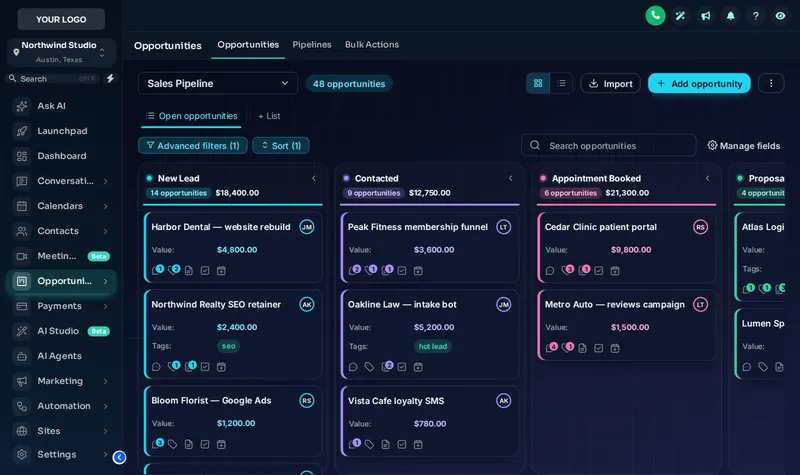
Midnight Neon design on the GoHighLevel opportunities board for roofing claims
Midnight Neon on the opportunities board: stage colors follow column position, so your claim stages pick them up.
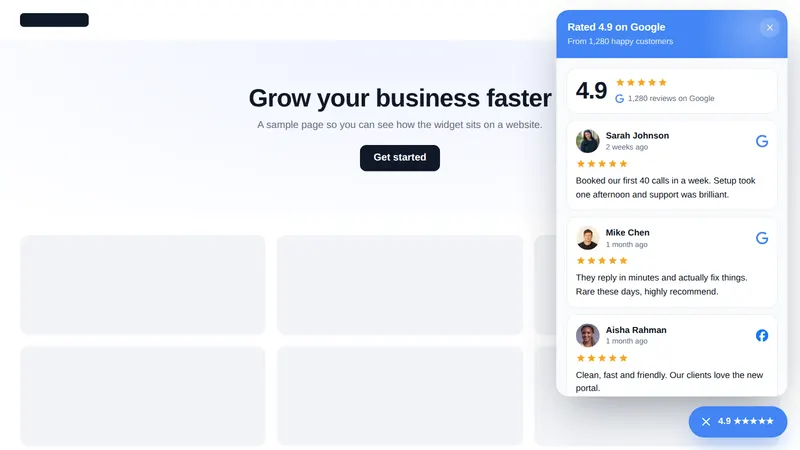
Google rating card floating widget open on a sample roofing website
The Google rating card floating widget on a roofing website, one of the Full Replacement widgets.
How it works

From payment to a re-roofed GoHighLevel in four steps

No kickoff call, no waiting on a designer. You are in the editor the same day you pay.

  1. Order the material

    Choose a package and pay

    Pick Shingle, Storm Ready and Full Replacement and pay once by card through Stripe. The account is created automatically the moment payment clears.

  2. Material on site

    Get your login by email

    Your login (email plus a temporary password) lands within minutes, at most 24 hours after payment. Check spam if it is slow.

  3. Lay the courses

    Customize in the live editor

    Log in, change the password, then choose a theme, a login design and the rest. Every change shows in a live preview before it touches your account.

  4. Cap the ridge

    Paste one line into GoHighLevel

    Copy one line into Agency Settings > Company > White Label > Custom JS (plus one CSS line for the login page). About 2 minutes, once. Later changes go live by themselves.

Straight answers

GHL theme design questions roofers ask

Ten answers about the account, the install and what changes in your GoHighLevel.

What is GHL theme design?

GHL theme design means changing how GoHighLevel looks for you, your team and your clients: colors, sidebar, login page, dashboards and pipeline boards. With a GHL Customizer account you do it yourself in a live editor and switch it on with one line of code, without touching contacts or workflows.

Is this a done-for-you design service?

No. You buy a self-serve GHL Customizer account. The login is emailed to you, you choose and adjust the designs yourself in the editor, and you paste one line into GoHighLevel. Help docs and our support team are there if you get stuck, but nobody designs or installs it for you.

How fast do I get access after paying?

The account is created automatically when Stripe confirms payment. Your login (email plus a temporary password) usually arrives within minutes and at most 24 hours later. Check spam if it has not shown up.

How much does it cost?

There are three one-time packages: Shingle at $197, Storm Ready at $477, Full Replacement at $967. No monthly fee and lifetime access. The difference is which modules the account unlocks and its limits.

Does it change my workflows, contacts or the Roofing Snapshot?

No. The customizer only changes how screens look and adds optional on-screen tools. Your contacts, pipelines, automations, claims data and any snapshot you installed stay exactly as they are. Remove the line of code and GoHighLevel looks stock again.

Do I need to know CSS or code?

No. Everything is point and click with a live preview. The only "code" is one line you copy from the editor and paste into Agency Settings > Company > White Label > Custom JS, plus one CSS line for the login page. It takes about 2 minutes, once.

Will my sub-accounts and clients see the new design?

Yes. The install sits at agency level, so every sub-account user who logs in through your white-label domain sees the theme, login page and menus you published. You can set designs per workspace if you run more than one brand.

Which package should a roofing company pick?

Shingle covers the look: themes, dark mode and every login design. Storm Ready adds the tools an office uses all day: dashboards, pipeline boards, menus and the contact actions bar. Full Replacement adds website popups, notifications, calculators and floating widgets that capture inspection requests.

What happens when GoHighLevel updates its interface?

The customizer team maintains the engines and the selectors they style, and updates reach your account automatically because the line you pasted loads the current version. You do not reinstall anything.

Is Roofing Snapshot part of HighLevel?

No. Roofing Snapshot is independent and is not affiliated with HighLevel Inc. The GHL Customizer is a third-party tool that works inside your own GoHighLevel agency account.

One-time payment, lifetime access

Your crew looks at GoHighLevel all day. Make it look like you.

Start with Storm Ready: themes, login pages, dashboards, pipeline boards, menus and contact actions in one account.

Get Storm Ready, $477Compare all three packagesLogin emailed within minutes (max 24 hours). Secure checkout by Stripe.
Work order

Your GHL Customizer account

One-time payment, lifetime access. Login emailed within minutes (max 24 hours).

PackageStorm Ready
$477one-time, USD
Choose your layer

Secure payment by Stripe. We never see your card details.

After payment the account is created automatically and your login (email plus a temporary password) is emailed to you, usually within minutes and at most 24 hours. You customize GoHighLevel yourself in the live editor. We never ask for your GoHighLevel login.