
Columns
Everything at once
Rename, reorder and hide menu items, move the menu to a top bar, open sub-menus as one of 8 mega menu styles and float a quick menu over every page. Point and click, no code.
Short answerGoHighLevel menu customization means changing the navigation your team sees: item names, order, which items are visible, sidebar or top-bar layout and how sub-menus open. The GHL Customizer does this from a visual editor; the pages and permissions behind each item stay the same.
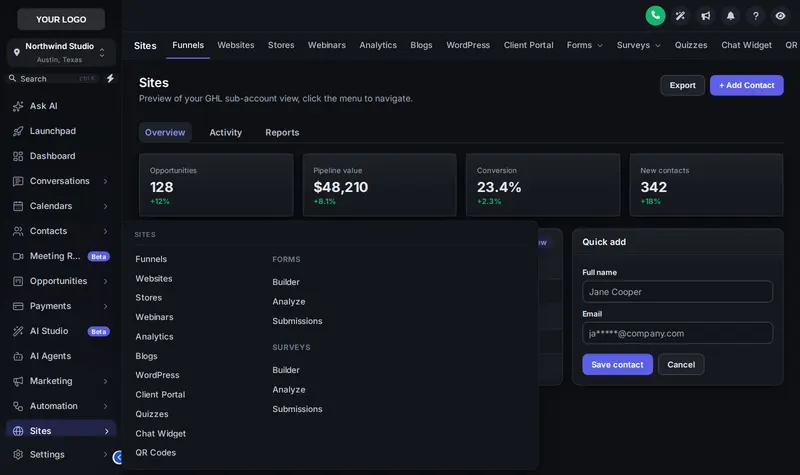
Hover Sites to see a mega menu open. Switch to Top bar to try its 8 styles, and change the header style underneath.
Mega menus help when a section like Sites or Payments has many items. Pick one style for the whole account.
Everything at once
List left, menu right
Hover an item, menu opens beside
Icon cards, click to open
Items as tabs, menu below
Slim icons + menu
Expands in place
Full-width band
For the handful of pages your office jumps between all day. Try the 3 layouts and 8 finishes, and drag it by its grip.
Canvassers on tablets need Contacts, Calendars and the claims board, nothing else. Hide the rest and put those three first.
Office staff live in Conversations and Opportunities. A floating quick menu gets them there in one click from any page.
Agencies rename items to match their own training material, so clients follow along without confusion. Pair it with a white label theme.
Shingle includes the sidebar or top-bar layout only.
Get Storm Ready, $477Choose a left sidebar, right sidebar, collapsed icons or one of 8 top-bar styles.
Drag items into the order your team works, rename them in your words and hide the ones nobody uses.
Keep plain lists or open sub-menus as one of 8 mega menu styles. Add a floating quick menu for the five pages people jump between.
Publish once; the new menu appears for every user in the workspace.
Yes. With the menu builder in Storm Ready and Full Replacement you rename, reorder and hide GoHighLevel menu items, for example "Opportunities" to "Claims board". The pages behind them do not change.
Yes. Choose a top-bar layout in any package (Shingle includes sidebar or top-bar layout). There are 8 top-bar styles, plus a merged header option, in the preview above.
A mega menu opens a sub-menu as a wide panel, columns or tiles instead of a short list, so items like Sites or Payments show everything at once. The customizer has 8 mega menu styles.
A small menu that floats over every page with the shortcuts you choose: dashboard, conversations, calendars, contacts, claims. It comes in 3 layouts and 8 finishes and can be dragged anywhere.
Shingle lets you pick a sidebar or top-bar layout. Renaming, reordering, hiding, mega menus and the floating quick menu need Storm Ready or higher.
No. Hiding is about clutter, not permissions. Use GoHighLevel’s user roles to control who may open what; use the menu builder to show each team the items they actually need.
Menus are published per workspace. Most roofing companies use one workspace and hide what nobody needs; agencies keep separate menus per brand in separate workspaces.
Yes. Your menu is stored in your account and re-applied on every page load by the installed line. If GoHighLevel adds a new item, it shows up and you can rename or hide it too.
Every module of the GHL Theme Design account has its own live preview. Compare what each layer includes on the pricing page.
Manage how we use cookies. Necessary cookies keep the site working and can't be turned off.
Saved on this device. Press Esc to close.