Themes · in every package
GHL themes and UI kits, in your company colors
27 complete GoHighLevel themes, 11 UI kits and dark mode. Choose them in a live editor, set your color and logo once, publish. No custom CSS to write or babysit.
Roof-deck picks · sidebar / accent
Midnight Mint, Lavender Dream, Pastel Mesh and 9 more, out of 27.
Live preview
Try GHL themes on a sample roofing sub-account
Start with Midnight Mint and the Accent Top kit, then switch to all 27 themes, change the kit, flip dark mode or look at the agency view.
Setting up the live preview…
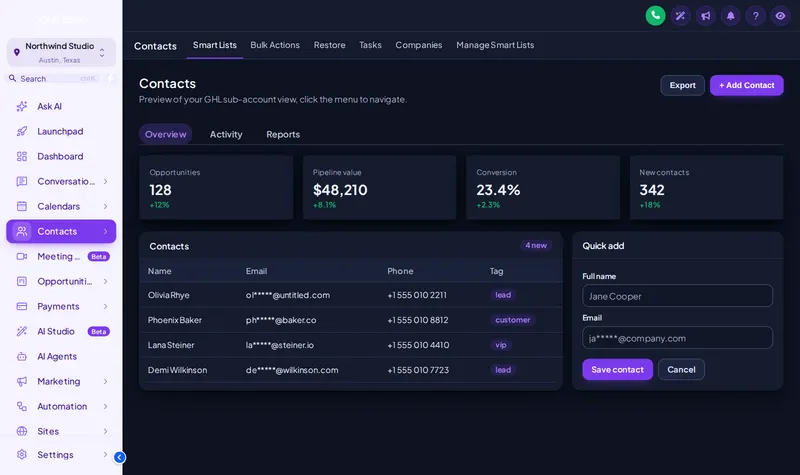
Midnight Mint: the real customizer engine re-skinning a sample roofing sub-account. Click around inside it: the menu, the collapse arrow and the Save contact dialog all respond.
Dark mode
GoHighLevel dark mode for the late shift
Short answerDark mode in the GHL Customizer turns GoHighLevel pages, cards, tables and inputs dark while keeping text readable. It works on top of any of the 27 themes and is included in every package.
Storm weeks mean office staff answering texts at 10 PM. A dark interface is easier on tired eyes and looks sharp on a big monitor in the war room. Turn it on for everyone, or keep the light theme for daytime and switch when you want.
UI kits
11 UI kits change the feel, not the colors
Same theme, different finish. A kit changes buttons, cards and inputs. Our default for roofing accounts is Accent Top: a colored strip on top of each card, like flashing on a ridge.
Bordered Flat
Elevated
Glass
Accent Top
Side Accent
Brutalist
Studio Gradient
Halo Glow
Crisp Highlight
Rounded Pill
Full catalog
All 27 GoHighLevel themes
Every theme ships in every account. Light or dark, left sidebar or top bar.
| Theme | Character | Layout | Base |
|---|---|---|---|
| Midnight Ember | Dark navy sidebar, orange energy | Left sidebar | Light |
| Arctic Clean | White top bar, crisp blue SaaS look | Top bar | Light |
| Ocean Glass | Frosted glass over an ocean photo, right dock | Left sidebar | Light |
| Forest Finance | Deep green, side accents, calm & trustworthy | Left sidebar | Light |
| Neon Nights | Purple-to-pink glow, bold and modern | Left sidebar | Light |
| Mono Studio | Black & white brutalist, top bar | Top bar | Light |
| Sunset Coral | Warm peach sidebar, round & friendly | Left sidebar | Light |
| Royal Navy & Gold | Premium navy with gold highlights | Left sidebar | Light |
| Lavender Dream | Pastel lilac, soft & airy | Left sidebar | Light |
| Slate Corporate | Neutral slate & indigo, compact & efficient | Left sidebar | Light |
| Aurora | Glass sidebar over a northern-lights photo | Left sidebar | Light |
| Desert Sand | Earthy beige & terracotta, top bar | Top bar | Light |
| Midnight Sky | Deep violet night, twinkling stars on the login | Left sidebar | Light |
| Editorial Studio | Crisp black & teal, magazine-style login | Left sidebar | Light |
| Cinematic City | Amber city lights, full-screen photo login | Left sidebar | Light |
| Care Desk | Friendly support blue, split photo login | Left sidebar | Light |
| Prism Pro | Dark indigo with a colour-ring login | Left sidebar | Light |
| Pastel Mesh | Soft light theme, morphing colour login | Top bar | Light |
| Alpine Glass | Frosted glass over misty mountains | Left sidebar | Light |
| Creative Agency | Crisp white & rose, top bar, photo-wall login | Top bar | Light |
| Golden Hour | Warm peach & amber, sunrise-hills login | Left sidebar | Light |
| Deep Space | Midnight blue & cyan, orbiting-planets login | Left sidebar | Light |
| Cyber Lime | Near-black with electric lime, light-beam login | Left sidebar | Light |
| Holo Pearl | Pearl white with pink-violet foil, holographic login | Left sidebar | Light |
| Graphite Pro | Dark mode , soft graphite with an indigo glow | Left sidebar | Dark |
| Obsidian OLED | Dark mode , true black with a vivid raspberry glow | Left sidebar | Dark |
| Midnight Mint | Dark mode , deep navy with fresh mint accents | Left sidebar | Dark |
Use cases
Who re-themes GoHighLevel, and why
The roofing company with a strong brand. Your trucks, yard signs and shirts already carry a color. The CRM your team opens 50 times a day should too.
The agency reselling a roofing sub-account. A white label theme makes the account look like your product instead of stock GoHighLevel. Add a matching login page design and rename items in the menu builder.
The team that tried custom CSS. Hand-written CSS breaks when GoHighLevel ships an update. The customizer engine is maintained for you, and changes in the editor go live without touching code again.
Which packages include themesOne-time payment, lifetime access
- Shingle · $197
- Included: 27 complete GoHighLevel themes, 11 UI kits and dark mode, recolored to your brand.
- Storm Ready · $477
- Included: 27 complete GoHighLevel themes, 11 UI kits and dark mode, recolored to your brand.
- Full Replacement · $967
- Included: 27 complete GoHighLevel themes, 11 UI kits and dark mode, recolored to your brand.
Step by step
How to apply a GoHighLevel theme
- Theme
Choose a theme
Start from any of the 27 themes. Each one sets the sidebar, header, page background, buttons and cards together.
- Kit
Add a UI kit
Lay one of 11 UI kits over it to change button shape, card depth, borders and inputs without losing the theme colors.
- Brand
Set your color and logo
Enter your brand color and upload your logo once. Every theme that follows the brand color updates with it.
- Mode
Decide on dark mode and publish
Turn on dark mode if your team wants it, check the preview on desktop and phone, then publish.
Straight answers
GHL theme questions
What GHL themes are included?
All 27 themes in the customizer catalog, 3 of them dark, and 5 built around a top-bar layout. Every account, from Shingle up, includes all of them, plus 11 UI kits and dark mode.
What is a UI kit in the GHL Customizer?
A UI kit is a layer on top of a theme that changes the shape and depth of components: rounded or square buttons, flat or shadowed cards, bordered inputs. There are 11 kits, so the same colors can look sharp and corporate or soft and friendly.
Can I make GoHighLevel dark mode?
Yes. Dark mode switches GoHighLevel pages, cards, tables and inputs to dark surfaces with readable text. You can use it with any theme, and the preview on this page has a dark mode toggle to try it.
Is a GHL theme the same as custom CSS?
It does the job custom CSS would, without you writing or maintaining CSS. The engine knows GoHighLevel’s markup and is updated when GoHighLevel changes, which is where hand-written CSS usually breaks.
Can I use my exact brand colors?
Yes. Set your primary color and logo once; themes and widgets that follow the brand color pick it up. You can also fine-tune individual colors in the editor.
Does the theme show for my clients’ sub-accounts too?
Yes. The install is at agency level, so sub-account users see the published theme. Agency view and sub-account view can both be previewed above.
Which package do I need for themes?
Themes, UI kits and dark mode are in every package: Shingle, Storm Ready and Full Replacement. Shingle at $197 one-time is enough if the look is all you want.
Which theme suits a roofing company?
Dark navy themes such as Midnight Mint read well next to orange and red truck branding; light themes such as Lavender Dream or Arctic Clean suit a bright office. The 12 roof-deck picks in the preview are a good shortlist.
Keep inspecting the account
Every module of the GHL Theme Design account has its own live preview. Compare what each layer includes on the pricing page.