Inspection booked
Starts the reminder and prep texts for the inspector the moment it is tapped.
A bar of quick tags, buttons and mini forms on every contact record. Your office marks an inspection booked, logs claim details or asks for a review without hunting through the contact screen.
Tap a tag to toggle it, open Claim details to see the mini form, change the position or drag the bar. Nothing is saved.
Setting up the live preview…
Bottom center: this is the real contact actions bar. Tap a quick tag to add or remove it, open Claim details to see its form, or drag the bar by its grip. Nothing is saved in the preview.
Short answerThe contact actions bar puts your most-used tags, buttons and small forms on every GoHighLevel contact record. Each tap adds or removes a real tag or saves a real custom field, so your existing workflows run as normal.
In storm season the office updates homeowner after homeowner all day. Each "add tag" in stock GoHighLevel is several clicks; a missed tag means a missed follow-up. One-tap chips make the right action the easy one, and the color tells everyone the state of the job.
It works best alongside the pipeline board designs and the CRM and workflow automations that listen for those tags.
Starts the reminder and prep texts for the inspector the moment it is tapped.
Flags the job so the estimator knows to be on the roof when the adjuster arrives.
Moves the homeowner into production follow-up and stops sales nudges.
Damage type, roof squares and date of loss saved to custom fields in one dialog.
Adds the tag your review request workflow listens for, right after the job is done.
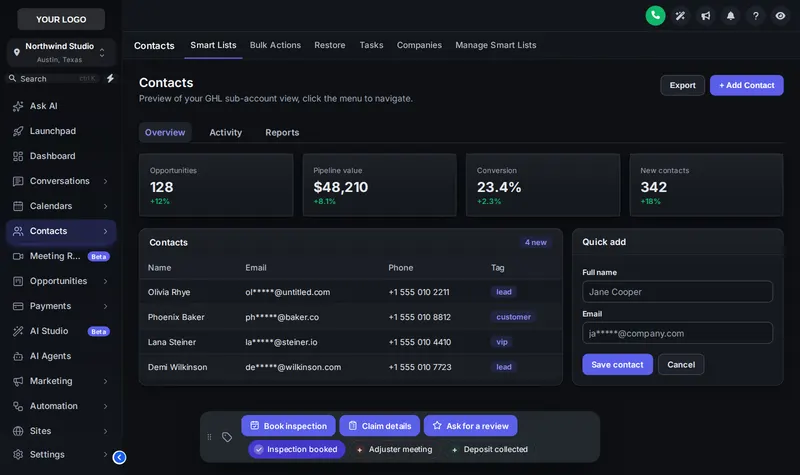
List the tags your office toggles most (inspection booked, adjuster meeting, deposit collected) and give each a color.
A button can add or remove tags, or open a small form that writes straight into the contact’s custom fields.
Pick one of 6 positions and decide whether staff can drag it.
Publish, and the bar appears on every contact record. Your existing tag-triggered workflows fire as usual.
It is a small bar the GHL Customizer adds to every contact record, with one-tap tag chips, buttons and mini forms. Staff update a homeowner in one click instead of opening the tag box or custom fields.
Yes. The bar adds and removes real GoHighLevel tags and writes real custom field values, so any workflow that starts on "tag added" or a field change runs exactly as if someone had done it by hand.
Custom fields on the contact, such as damage type, roof squares or date of loss. You choose the fields, labels and input types (text, number, date, dropdown).
In 6 positions: Bottom center, Bottom left, Bottom right, Top center, Top left, Top right. You can also let staff drag it out of the way.
Yes. Use the tag names your snapshot workflows already listen for. That way a canvasser tapping "inspection booked" starts the same follow-up your snapshot sends today.
Storm Ready and Full Replacement. Storm Ready is $477 one-time.
Yes: a color per tag, your single brand color, or green when the tag is on and gray when it is off. All three are in the preview on this page.
No. The preview runs the real bar on a copy of GoHighLevel, but nothing is saved or sent anywhere.
Every module of the GHL Theme Design account has its own live preview. Compare what each layer includes on the pricing page.
Manage how we use cookies. Necessary cookies keep the site working and can't be turned off.
Saved on this device. Press Esc to close.