GoHighLevel dashboard design your office reads at a glance
Pick one of 18 dashboard designs for the GoHighLevel home screen and publish it yourself. Same widgets, same numbers, a home screen that looks built for a roofing company. Included in Storm Ready and Full Replacement.
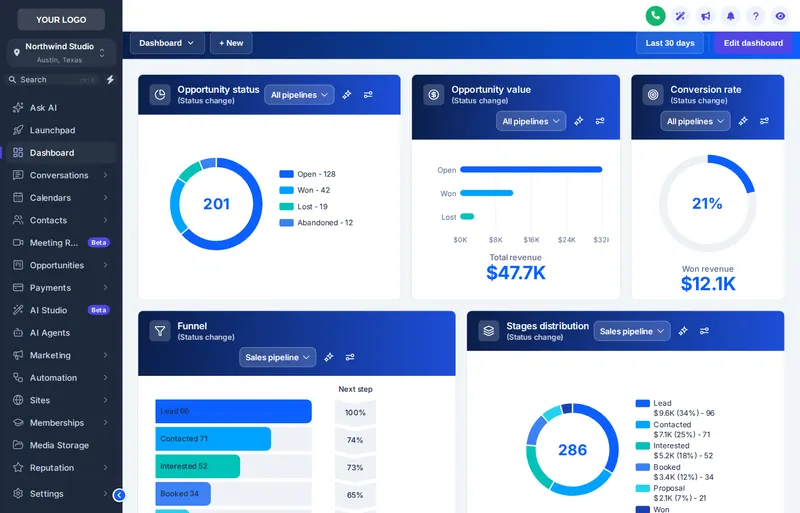
Short answerA GoHighLevel dashboard design restyles the home screen widgets (cards, charts, header and colors) without changing the data inside them. In a GHL Customizer account you choose from 18 designs, preview them on a copy of GoHighLevel and publish in one click.
Try every dashboard design on a sample roofing account
Filter by style, pick a design, then change the sidebar under it. It opens on Ocean Pro, our pick for a roofing office.
Setting up the live preview…
Ocean Pro: every chip is one of the real dashboard designs, applied by the customizer engine to a copy of the GoHighLevel dashboard. The clock is live; quick links and chart colors belong to each design.
Why roofing offices change the home screen first
| On a stock dashboard | With a designed dashboard |
|---|---|
| Every widget looks the same, so open claims and lost deals blur together after a hail week. | Header bands and chart colors separate pipeline, revenue and conversion at a glance. |
| New office staff ask where to look first. | A greeting, live clock and quick links point them to calendars, contacts and the claims board. |
| The home screen still says "software", not your company. | Designs follow your brand color, so the dashboard matches your sidebar and login page. |
| Night shifts during storm surges stare at a bright white screen. | 5 dark designs, easy on the eyes after sundown. |
What roofers put on the GoHighLevel dashboard
The office manager's morning view
Opportunity status, today's inspections on the calendar widget and revenue by stage. A light design with clear header bands keeps it readable on a second monitor.
The owner's weekly check
Won revenue, conversion rate and stage distribution after a storm push. Pair the dashboard with pipeline board designs so the board and the numbers tell the same story.
The agency's client-facing account
A photo design with your agency colors makes a resold roofing sub-account feel like a product. Combine it with a branded login page and theme.
- Shingle · $197
- Not included
- Storm Ready · $477
- Included: 18 dashboard designs for the GoHighLevel home screen, in light, dark and photo styles that take your colors.
- Full Replacement · $967
- Included: 18 dashboard designs for the GoHighLevel home screen, in light, dark and photo styles that take your colors.
The dashboard designer comes with pipeline designs, menus and the contact actions bar.
Get Storm Ready, $477How to change the GoHighLevel dashboard design
Takes a few minutes once your account is set up. Getting set up: login emailed within minutes (max 24 hours).
- Open
Open Dashboards in the editor
Log in to your GHL Customizer account and open the dashboard designer. The live preview shows a copy of the GoHighLevel home screen.
- Choose
Pick one of the designs
Filter by light, dark or photo and click through all 18. Charts, headers and quick links restyle instantly.
- Match
Match it to your brand color
Designs that follow your brand color pick up the color you set once for the whole account, so the dashboard matches the sidebar and login page.
- Publish
Publish
Hit publish. If the one-line install is already in GoHighLevel, the new dashboard appears for your team on their next page load.
Dashboard design questions
Can I change the GoHighLevel dashboard design?
Yes. With a GHL Customizer account on Storm Ready and Full Replacement you choose one of 18 dashboard designs and publish it to your GoHighLevel. Your widgets and their data stay the same; the design changes the cards, charts, headers and colors around them.
Does a dashboard design change my reports or numbers?
No. The same GoHighLevel widgets read the same data. The design changes how they are presented: card style, chart colors, header bands, a greeting with a live clock, and quick links on some designs.
How many dashboard designs are there?
18 in total: 7 light, 5 dark and 6 photo designs with an image header. You can switch between them any time.
Which package includes the dashboard designer?
Storm Ready and Full Replacement. The cheapest way in is Storm Ready at $477 one-time.
Can each sub-account have a different dashboard?
Designs are published per workspace. Agencies that run separate brands put each brand in its own workspace, each with its own dashboard, theme and login page, within the workspace limit of their package.
Will the dashboard work for my canvassers on phones?
Yes. The designs are responsive, and the preview above has a phone toggle so you can see how a crew member on a phone would see the home screen.
Do I still build widgets in GoHighLevel?
Yes. You keep adding and arranging widgets in GoHighLevel as usual. The customizer only styles them, so a new widget you add picks up the design automatically.
What is a good dashboard design for a roofing company?
Most offices pick a light design such as Ocean Pro for day work and a dark one for late storm-week shifts. Photo designs suit owners who want the company look up front. Try them in the preview: the clock is live and nothing is saved.
Keep inspecting the account
Every module of the GHL Theme Design account has its own live preview. Compare what each layer includes on the pricing page.