
Clean Light
Soft grey lanes, white cards, colour dot per stage
12 designs for the GoHighLevel opportunities board. Stage colors, stronger cards and clearer values, so inspection, adjuster, approved and deposit never blur together during a storm surge.
It opens on Midnight Neon. Click any design, change the sidebar, open a card. The board is a copy of GoHighLevel’s, restyled by the real engine.
Setting up the live preview…
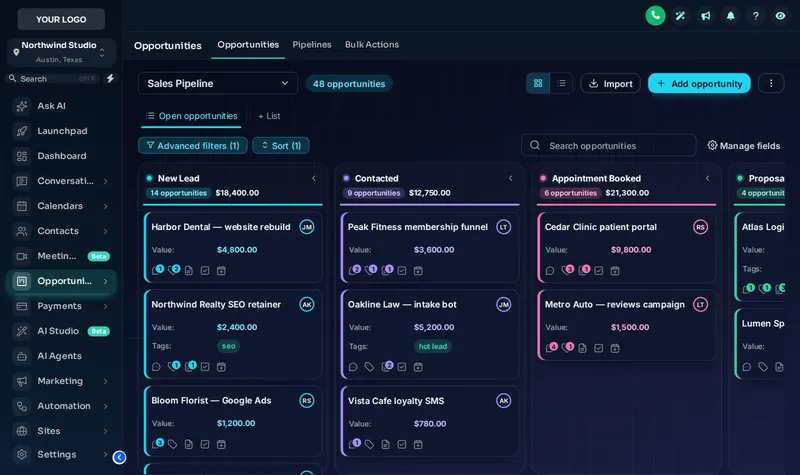
Midnight Neon: a copy of the GoHighLevel opportunities board, restyled by the real engine. Stage colors follow column position, so your own stages (inspection set, adjuster meeting, approved, deposit) pick them up whatever you call them.
Short answerA GHL pipeline design restyles the opportunities board: column headers, stage colors, deal cards and values. In the GHL Customizer you pick one of 12 designs and publish it; your stages, deals and automations are not touched.
One hail storm can fill the board with new opportunities in a few days. When every column looks the same, deals sit in "adjuster meeting" for days because nobody notices. Distinct stage colors and stronger cards make stuck jobs stand out, and pairing the board with a dashboard design gives the owner the same picture in numbers.
If you run the Roofing Snapshot, its claim stages already follow the inspection-to-deposit path; a board design just makes that path easier to read. More on the claim flow on the insurance claims page.
Soft grey lanes, white cards, colour dot per stage
Colour-mesh board, see-through lanes and cards
Deep navy board, glowing stage lines, neon accents
Thick outlines, hard shadows, loud stage colours
Each lane softly tinted in its own pastel colour
Bold gradient stage headers above clean cards
Dense and flat: more deals on screen at once
Stage-coloured ribbons and lightly tinted cards
Black and gold, premium and calm
Corporate blues, solid header bands
Fresh greens, soft tinted lanes
Stage colours built from your primary colour
Comes with the dashboard designer, menus and the contact actions bar.
Get Storm Ready, $477In your account, open Pipelines. The preview loads a copy of the GoHighLevel opportunities board.
Click through the 12 designs. Column headers, cards, values and stage lines restyle together.
Stage colors follow column position, so your own stage names (inspection, adjuster, approved, deposit) take the colors in order.
Publish, and the board design appears in every pipeline in the workspace the next time your team opens Opportunities.
Yes. A GHL Customizer account on Storm Ready and Full Replacement includes 12 designs for the opportunities board. You choose one in the editor and publish it; your pipelines, stages and deals stay exactly as they are.
No. Colors are applied by column position, not by stage name. Whatever you call your stages, the first column takes the first color, the second the second, and so on.
12, of which 2 are dark. Our pick for roofing claims boards is Midnight Neon: deep navy board, glowing stage lines, neon accents.
No. Values, owners, tags and every workflow triggered by a stage change work as before. The design only changes what the board looks like.
Yes. The design applies to the opportunities board as a whole, so every pipeline you switch to in the dropdown uses it.
Storm Ready and Full Replacement. Storm Ready at $477 one-time is the entry point, and it also includes dashboard designs, menus and the contact actions bar.
The board is styled in the browser on any screen size. The GoHighLevel mobile app is a separate native app and is not restyled by the customizer.
Any time. Pick another design, publish, and the board updates. Version history keeps your recent saves so you can step back.
Every module of the GHL Theme Design account has its own live preview. Compare what each layer includes on the pricing page.
Manage how we use cookies. Necessary cookies keep the site working and can't be turned off.
Saved on this device. Press Esc to close.