It is a Tuesday after a hail line rolled through Saturday night. A homeowner fills out your website form at 9:14 a.m. while you are up a steep 9:12 pulling a soft-metal test, and it lands in an inbox you do not check on a roof. At lunch you copy her address into EagleView and order a report that sits in a browser tab. Your canvasser shot forty photos of her neighbor’s hail bruising into CompanyCam, but those live in a folder your estimator never opens. By Thursday she signed with the crew that texted her back at 9:16. You did not lose that job on price. You lost it in the gap between three apps that do not talk to each other.
Here is the short answer. Most small roofing shops do not have a software problem, they have a seams problem. The CRM, the measurement tool, and the photo app each do their one job fine, but every handoff between them is manual, and every manual handoff is a place a lead, a claim, or a follow-up quietly dies. The fix is not a fourth app. It is one connected system that catches the lead, carries it through the measurement and the claim without retyping anything, and keeps following up while you are on the roof. This post walks the six seams where jobs fall through.
Key Takeaways
- Your apps are fine. The gaps between them are the problem. The jobs you lose fall into the seams where one tool hands off to the next by hand.
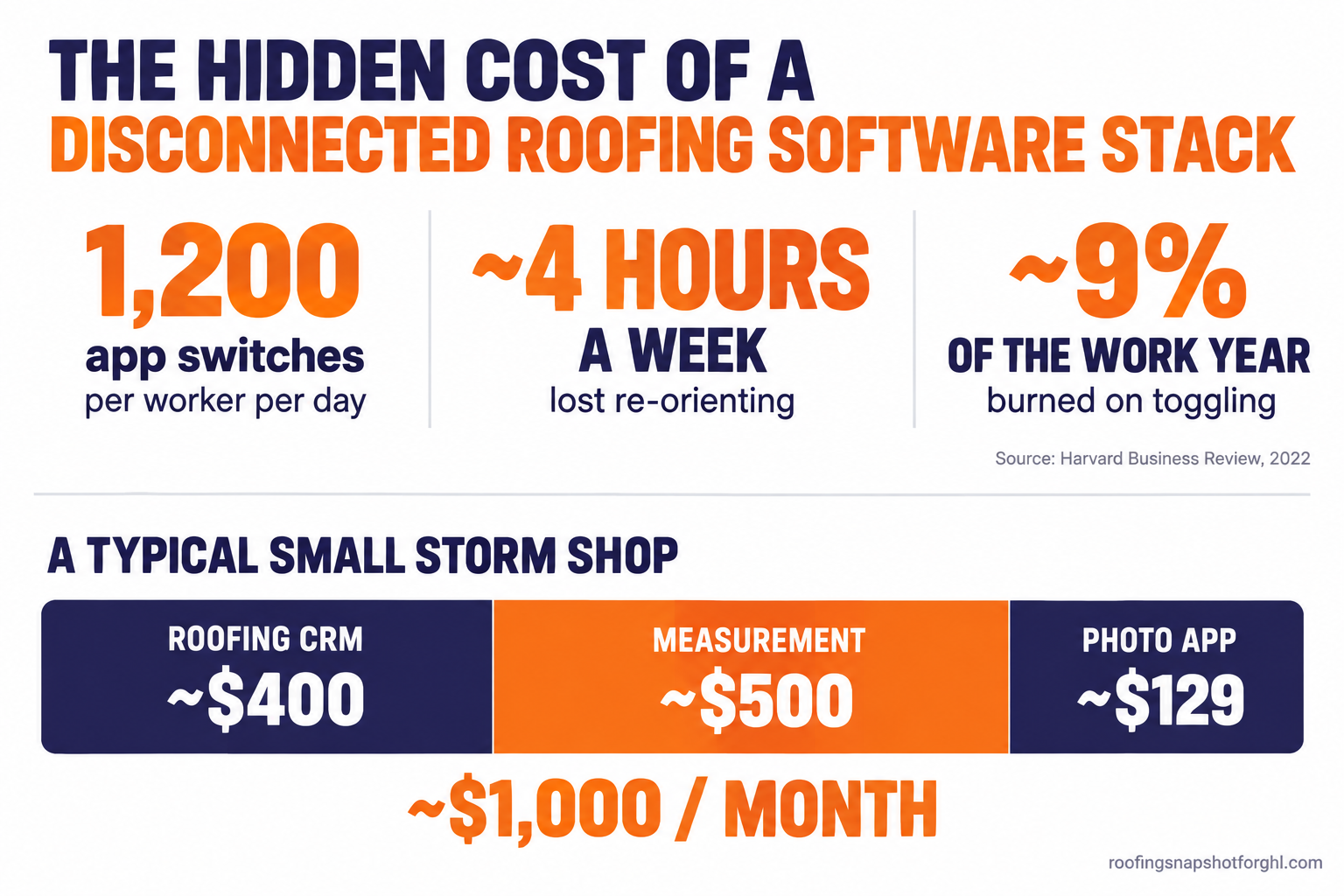
- The hidden tax is measured. The average worker switches between apps nearly 1,200 times a day and loses close to four hours a week re-orienting, about 9% of the work year (Harvard Business Review, 2022). For a roofer, every switch is a minute a hot lead is calling the next guy.
- The storm makes it catastrophic. The US logged 5,432 hail events in 2025 (III/NOAA), and a single front drops dozens of leads overnight. State Farm alone paid more than $3.8 billion for home hail-repair claims in 2024 (State Farm). Handoffs that limp along in a quiet week collapse in a storm week.
- EagleView, Hover, and CompanyCam are not CRMs. Do not expect your measurement tool or photo app to capture leads, track claims, or run follow-up. They were never built to.
- The fix is connection, not more software. One system that catches the lead, carries it through measurement and the claim, and follows up automatically closes all six seams at once.
Table of contents
- What the three-app shuffle is actually costing you
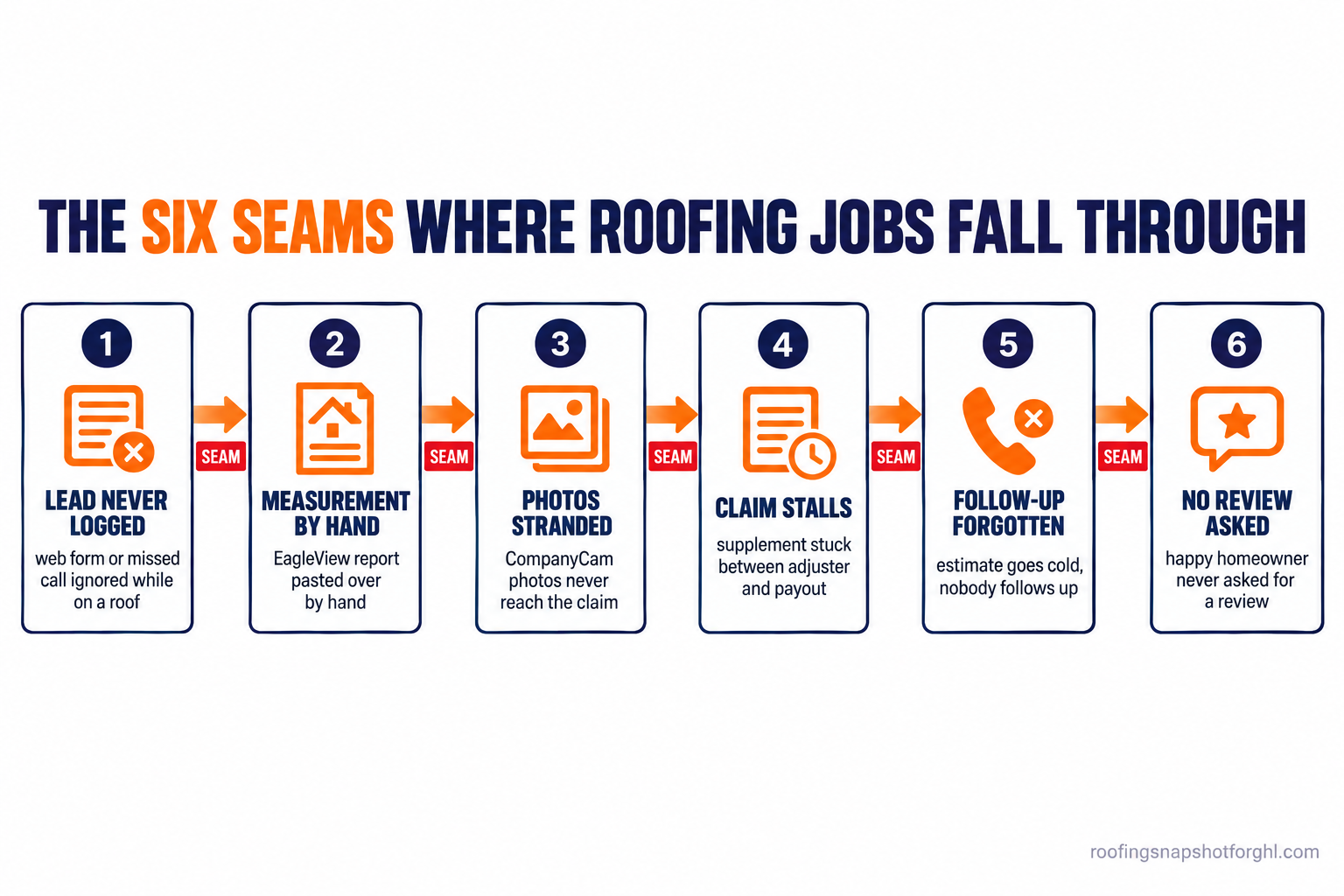
- The six seams where jobs fall through
- Seam 1: The lead that never becomes a contact
- Seam 2: The measurement you order and paste back by hand
- Seam 3: Field photos stranded in a photo app
- Seam 4: The claim that stalls between the adjuster and the supplement
- Seam 5: The follow-up that depends on you remembering
- Seam 6: The finished job that never asks for the review or referral
- Do EagleView, Hover, and CompanyCam already do this?
- Run the numbers for a solo, a mid-size, and a large shop
- Steal this: the messages that close the seams
- Objections
- FAQ
What the three-app shuffle is actually costing you
The monthly bills are not the painful part. Each bill buys a tool that stops at its own edge.
A roofing CRM is real money. We broke down the market in what roofing software actually costs in 2026, but the short version is that AccuLynx (being acquired by Verisk for $2.35 billion Verisk, 2025) and JobNimbus hide pricing behind a demo, and reviewers report add-on fees for texting, documents, and integrations pushing the monthly cost well past the base plan (Capterra reviews). A measurement tool bills per report: EagleView roof reports are reported to run roughly $18 to $91 each depending on tier (ContractorToolStack). A photo app like CompanyCam publishes its prices: about $63 a month for Core, $129 for Crew, and $199 for Scale billed annually, plus $29 per extra user (CompanyCam). None is outrageous alone. Stacked and disconnected, they are.
The real cost is the toggling tax. Harvard Business Review found the average worker flips between apps and windows nearly 1,200 times a day and loses close to four hours a week reloading context (HBR, 2022). On a roofing crew that is lost jobs, because the hours you spend copying addresses into EagleView and pasting measurements into a proposal are hours a storm lead is shopping three other contractors. Here is a realistic monthly stack.
Illustrative monthly software spend for a small storm shop. CRM figure is a mid-range illustrative cost (full breakdown in what roofing software costs in 2026); measurement at ~20 EagleView reports a month (ContractorToolStack); photo app at CompanyCam’s Crew tier (CompanyCam).
Call it a thousand dollars a month, and not one of those tools answers a lead or chases an adjuster. That work still lands on you.
The six seams where jobs fall through
A job is a chain: lead comes in, you measure, you inspect and photograph, the claim gets filed, you follow up, the job closes, you harvest the review and referral. Each link lives in a different tool, and each gap between links is a seam you paper over by hand, until a storm week drops forty leads overnight and the seams split wide open. Here is each one.
Seam 1: The lead that never becomes a contact
How it breaks. A web form, a missed call, or a Facebook message comes in while you are on a roof, and it sits unread. By the time you climb down, the homeowner already has the crew that answered first on their porch. The lead never became a tracked contact, so there was no follow-up and you never knew you had it. Speed is the whole game, and we lay out the math in why a 30-second response wins storm jobs.
How a connected system closes it. The lead hits one inbox the second it lands, and an automation fires a text back inside a minute. A missed call triggers an instant “sorry I missed you” text so the caller does not dial the next number, the engine we built in never miss a storm call.
Seam 2: The measurement you order and paste back by hand
How it breaks. You pull the address from one tool, type it into EagleView or Hover, then copy the squares and pitch into a proposal in a third place. Every step is manual, and manual steps get skipped on a busy day. So the measurement comes back accurate and stalls because it is nobody’s job to move it, and the homeowner waits two days for a number. The tool did its job. The handoff did not.
How a connected system closes it. The contact record already holds the address, so ordering a measurement means no retyping, and the finished report attaches straight to the job. The squares and pitch flow into the estimate instead of getting copied by hand, and the measurement tool stops being an island.
Seam 3: Field photos stranded in a photo app
How it breaks. Your inspector shoots beautiful, time-stamped documentation of the hail bruising and creased shingles in CompanyCam. Then it sits in a folder your office, estimator, and supplement never pull from. The person building the insurance scope cannot see it without logging into a separate app, so they build off memory or a few texted screenshots. The strongest evidence you own never makes it into the claim file where it would have won a supplement.
How a connected system closes it. The photo app keeps capturing, but each photo set now ties to the job record everyone works from, so the estimate, the claim packet, and the homeowner update all pull from the same evidence.
Seam 4: The claim that stalls between the adjuster and the supplement
How it breaks. The adjuster came, the scope came back light, and the supplement is “in progress,” which means it is on a sticky note on your truck dash. The claim lives in your head and your email, not a pipeline: no stage, no next action, no clock, so approved jobs cool off because nobody fired the next step. This is where most roofing revenue quietly leaks, mapped in the insurance claim follow-up system that stops jobs from dying. One caution for any connected setup: automate the tracking and homeowner updates, never the claim handling itself, because adjusting or negotiating a claim without a license is illegal in a growing list of states.
How a connected system closes it. The claim becomes a pipeline with named stages from inspection to deposit, each with an owner and a due date. The homeowner gets automatic status updates so they stop calling, and your team gets a task the moment a stage goes stale.
Seam 5: The follow-up that depends on you remembering
How it breaks. The estimate went out, the lead went quiet, and the only follow-up plan is you, remembering, after a fourteen-hour day, to text a dozen people you quoted last week. You are the automation, and you are exhausted. The quote that needed one more nudge dies in a full memory. A connected system makes follow-up a cadence that runs itself, the same engine behind a compliant storm lead follow-up sequence.
How a connected system closes it. Every lead and open estimate drops into a timed sequence of texts, calls, and emails that fires whether you remember or not, and stops the instant the homeowner replies or books.
Seam 6: The finished job that never asks for the review or referral
How it breaks. The crew tears off, decks, and dries in a clean job, and the homeowner is thrilled on the day. Then you drive to the next storm and never ask for the Google review or the three-neighbor referral. The ask depends on a slammed human remembering to send a text, so the five-star moment passes, the review never gets left, and your profile stays thin while the out-of-state crew with eighty reviews outranks you. Reviews decide who gets the call, and we cover the playbook in how to get more Google reviews for your roofing company.
How a connected system closes it. The moment a job is marked complete, an automatic review request goes out while the homeowner is still delighted, with a one-tap link to your Google profile, and unhappy replies route privately to you instead of the public page. The same trigger drops the homeowner into a referral ask and a reactivation list for next season.
Do EagleView, Hover, and CompanyCam already do this?
Let me be blunt about the category. EagleView and Hover are measurement tools. They turn a roof into accurate squares, pitch, and waste without a ladder and a wheel. CompanyCam is a photo documentation tool. All three are excellent at the one job they were built for, and none was ever built to be your CRM.
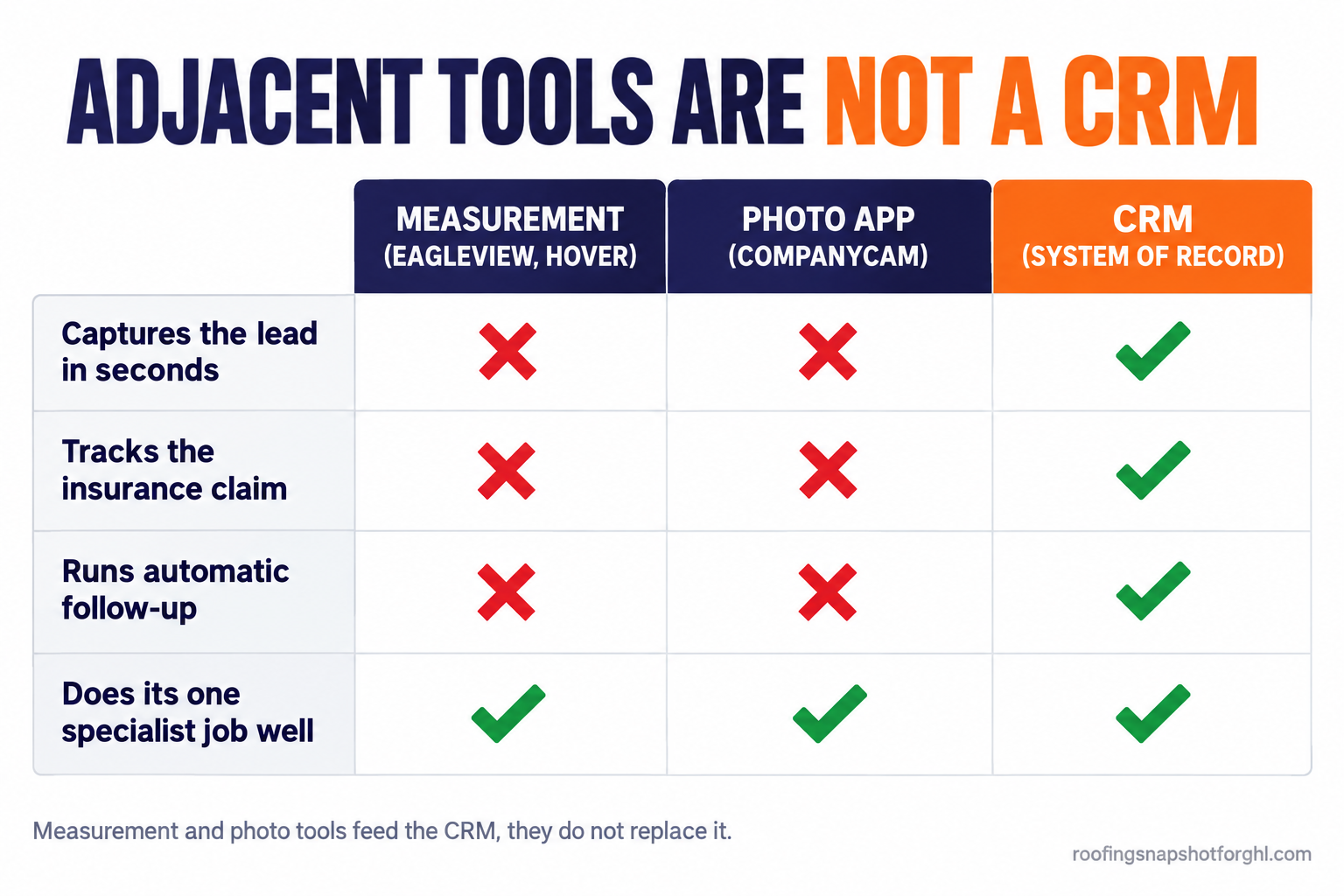
A CRM is the system of record for the customer: the lead the instant it lands, the pipeline stage, the timed follow-up, the claim from inspection to deposit, the review after the final nail. Expecting a measurement tool to text a lead back in ninety seconds, or a photo app to chase an adjuster, is asking a nail gun to cut rafters. The fix is a CRM and automation layer underneath the specialist tools that catches the lead, holds the record, and runs the follow-up.
Run the numbers for a solo, a mid-size, and a large shop
The seams hurt every shop, but the fix depends on how many crews you run.
Solo operator, owner on every roof. You are the CRM, the dispatcher, and the follow-up. Seam 1 costs you most, because you cannot answer a form at 9:14 while pulling a test square. An instant text-back and a missed-call auto-text recover jobs you did not know you were losing.
Mid-size shop, 3 to 5 crews. Now you have reps and a part-time office person. Leads get contacted, but follow-up and claim tracking are inconsistent. Seams 4 and 5 are your leak. Standardize the claim pipeline so every job moves the same stages on the same clock, make follow-up fire automatically, and get field data into the record the same night, the problem in door knocking with a CRM.
Large shop, 6-plus crews and a real office. You likely already run AccuLynx or JobNimbus, and ripping it out is not the move. The problem is that the expensive CRM does after-hours follow-up poorly, and the handoffs to the measurement and photo apps are still manual for your coordinators. Run a connected automation layer alongside the CRM to own speed-to-lead and follow-up, and consolidate seam by seam. If you are weighing the big platforms first, start with JobNimbus vs AccuLynx and ServiceTitan alternatives for roofers.
Steal this: the messages that close the seams
Four short messages, firing automatically at the right moment, recover most of the revenue in this post. Lift this copy. Keep every message opted-out-able, and keep claim talk general, never offering to handle or negotiate the claim.
The missed-call text-back (Seam 1), within a minute of a missed call:
Hi, this is Dale with [Company]. Sorry I missed you, I’m on a roof right now. Did you have storm damage you wanted looked at? I can get you a free inspection this week. Reply here and I’ll lock in a time. Reply STOP to opt out.
The homeowner photo update (Seam 3), after the inspection:
Hi [Name], we finished documenting your roof today and found hail bruising on the south and west slopes. I’ve saved the photos to your file. I’ll walk you through what they show and your options on a quick call. Does tomorrow at 10 or 2 work? Reply STOP to opt out.
The claim status update (Seam 4), on each stage change:
Update on your roof claim: your adjuster scope came back and we’re submitting supporting documentation for the items it missed. Nothing you need to do right now. I’ll text you the moment we hear back. Reply STOP to opt out.
The review request (Seam 6), the day after job completion:
Hi [Name], it was a pleasure getting your roof buttoned up. If you were happy with the crew, a quick Google review helps my small shop more than you know: [review link]. If anything fell short, reply here first so I can make it right. Reply STOP to opt out.
One rule for all four: a plain text that sounds like a real roofer, sent in ninety seconds, out-closes a polished email sent at 2 p.m. Automate the timing, keep the voice human, and always leave a clean opt-out so you stay inside the TCPA and carrier texting rules.
Objections
“I like EagleView and CompanyCam. I don’t want to give them up.” Good, keep them. The point is they stop being islands. You add a system of record underneath them that catches the lead and runs the follow-up, and the measurement and photos feed in.
“Isn’t putting everything in one system risky?” Spreading everything across three disconnected systems is the risk. A connected system is not one fragile app, it is your customer record in one place with the follow-up attached, while the measurement and photo tools keep their specialist jobs.
“I’m not technical, and I’m locked into contracts.” You do not need to break anything on day one or wire this together yourself. Connecting three apps yourself feels like a six-month IT job, but it is not when someone installs a pre-built system into your account, the premise behind migrating a roofing business into GoHighLevel. Most shops close the one or two seams bleeding the most, run that alongside existing tools, and fold in the rest as contracts renew.
Frequently asked questions about connecting your roofing software
Do I have to replace my roofing CRM to fix this?
No. If you already run AccuLynx, JobNimbus, or ServiceTitan, keep it and add a connected automation layer for the things most roofing CRMs do poorly: instant speed-to-lead text-back and consistent follow-up. Many shops run the two together and consolidate later.
Can EagleView or Hover work as my CRM?
No. EagleView and Hover are measurement tools. They produce accurate squares, pitch, and waste, but they do not capture leads, hold a pipeline, track claims, or run timed follow-up. Treat them as specialist inputs that feed your system of record.
Is CompanyCam a CRM?
No. CompanyCam is a photo documentation tool, and a very good one. It is not built to answer a lead in ninety seconds, chase an adjuster, or request a review. Connect it to a CRM so the photos land in the job record your office and claims work from.
Won't automated texts annoy my customers?
Not when they are timed and human. Homeowners after a storm want a fast, clear answer, and a plain text sent in a minute reads as responsive, not spammy. The failure mode is volume and tone, so keep each message useful, keep a clean opt-out, and respect the TCPA and carrier texting rules.
What should I fix first if I only change one thing?
Lead capture and speed-to-lead text-back, Seam 1. It is the cheapest to close and recovers jobs you do not even know you are losing, because an unanswered form or missed call leaves no trace.
Back to that Tuesday homeowner who signed with the crew that texted at 9:16. She was not shopping for the cheapest roof, but for the one who acted like he wanted the job while her ceiling was still stained. The crew that won did not have a better price or measurement tool. They had a system that answered while they were on a roof, carried her from text to inspection to claim without anyone retyping her address, and asked for the review the day after the final nail. You do not need a fourth app. You need the three bills you already pay to talk to each other.