
Construction companies live and die by the quality of their bids, relationships, and timing. But let’s be honest—manual tracking, missed follow-ups, and scattered leads make scaling a construction business harder than it should be.
If you’re a general contractor, remodeler, roofer, or specialty trades business juggling spreadsheets, post-it notes, or outdated CRMs… It’s time for an upgrade.
GoHighLevel offers a fully integrated, automated platform designed to take your lead tracking, job quoting, and sales follow-up off your hands—without losing the personal touch that wins deals.
In this complete guide, we’ll walk through:
- Setting up automated sales tracking for construction leads
- Managing projects and proposals through CRM pipelines
- Automating follow-ups across SMS, email, and voice
- Using real-time dashboards for performance tracking
- And how GoHighLevel saves time while increasing revenue
Quick Takeaways
- Automate the full lead journey from inquiry to signed contract.
- Reduce dropped bids and ghosted estimates with automated follow-ups
- Assign leads by project type, ZIP code, or sales rep
- Monitor pipeline health visually and make data-backed decisions.
- Integrate quoting, scheduling, and marketing in one place.
Why Sales Automation Matters in Construction
Construction is a high-ticket, high-trust industry. The sales process is longer and more complex than in other sectors—typically involving:
- Inquiries from multiple channels (website, Google, referrals, social)
- On-site inspections or calls
- Multiple follow-ups before closing
- Bids, change orders, contracts, and payments
Missing one follow-up can mean losing a $15,000+ job. And yet, most contractors still use pen-and-paper or unconnected apps to track leads.
GoHighLevel changes this by:
- Centralizing lead data
- Automating communication
- Tracking every interaction
- Offering instant visibility into sales pipelines
Step-by-Step Setup of Automated Sales Tracking in GoHighLevel
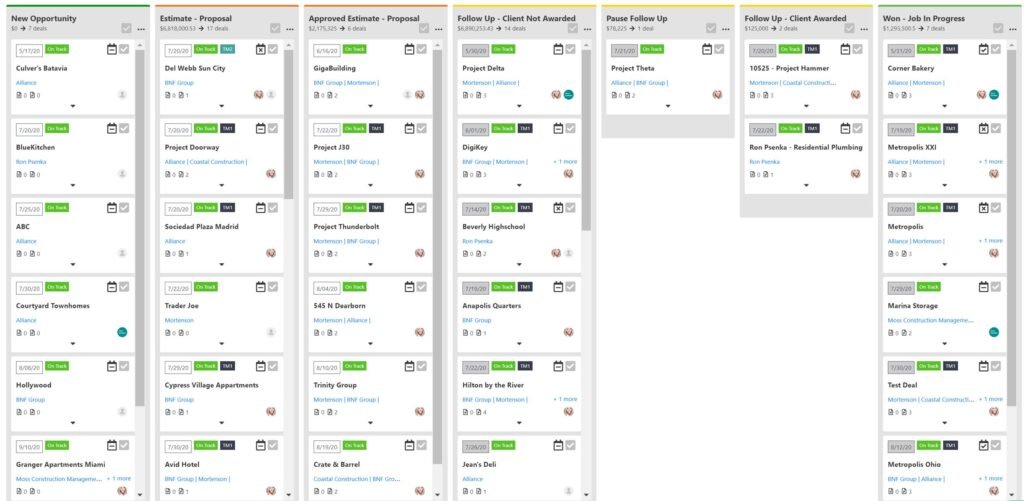
1. Build a Construction Sales Pipeline
Inside GoHighLevel, navigate to Opportunities > Pipelines > +New Pipeline.
Set up stages based on your real-world process. Here’s a sample pipeline for construction:
- New Lead
- Appointment Scheduled
- Inspection Completed
- Estimate Sent
- Follow-Up 1
- Follow-Up 2
- Verbal Approval
- Contract Signed
- Job Started
- Won / Lost
Each lead automatically moves through this visual board as you update their status.
✅ Bonus Tip: Use separate pipelines for different services (roofing, remodeling, solar) or sales reps.
2. Capture Leads Automatically from All Channels
Leads can come from a variety of sources—your website, social ads, Google profile, or phone calls.
With GoHighLevel, you can automatically funnel them into your CRM:
| Lead Source | Captured via |
|---|---|
| Website Forms | Embedded GHL forms or funnels |
| Google Business Messages | GBP integration |
| Facebook/Instagram DMs | Native GHL Social Inbox |
| Phone Calls | AI voice receptionist or call tracking line |
| Text Messages | Two-way SMS with auto-tagging |
| Referral Forms or Walk-ins | Manually entered or QR code scans |
Each lead is logged with a timestamp, contact info, source, and notes.
3. Automate Immediate Follow-Ups to Prevent Drop-offs
Leads go cold fast. GHL solves this with automated workflows. When a lead comes in, trigger:
- A personalized SMS confirmation (e.g., “Thanks for reaching out, we’ll call you in 10 mins.”)
- An automated voicemail (via ringless voicemail drop) introducing your team
- A follow-up email with your service brochure or intro video
Here’s a common 7-day automation:
Day 0: SMS + Voicemail + Email
Day 1: “Just checking in” text
Day 3: Email with client testimonials
Day 5: SMS with a call booking link
Day 7: “Still interested?” final touch
💡 Personalize each message with custom fields like {First Name}, {Project Type}, or {ZIP Code}.
4. Use Smart Routing for Team Assignments
GoHighLevel workflows can automatically assign leads based on:
- ZIP code or city
- Project type (roofing, renovation, etc.)
- Lead source (ad campaign, organic)
- Availability on the calendar
You can also round-robin assign to your sales reps or estimators to keep things fair and fast.
5. Keep All Communication in One Thread
No more digging through your phone, Gmail, and Facebook inbox. Every call, SMS, email, and DM is logged inside one clean contact thread.
You can:
- Reply from your mobile or desktop
- See past estimates or invoices
- Record and replay calls
- Tag teammates for help or to follow up on next steps.
This makes handoffs smooth, especially when an estimator hands off a deal to production.
6. Track KPIs with Real-Time Sales Dashboards
GHL offers drag-and-drop dashboards so you can track:
- Number of leads per week
- Win rate per pipeline stage
- Average deal value
- Pipeline velocity (how fast leads move)
- Source ROI (e.g., Facebook Ads vs. Referrals)
You can even set goals for each rep or team and measure results monthly.
7. Automate Post-Sale Follow-Ups and Reviews
Once a job is completed, trigger:
- A thank-you text/email
- A Google review request (with your custom link)
- An offer for referral bonuses
- Optional warranty follow-ups (e.g., 1-year check-in)
This not only drives repeat business but also helps build your online reputation—which directly boosts your SEO.
Practical Use Case Example
Business: Sam’s Siding & Roofing
Challenge: Losing track of leads and estimates due to job site distractions
Solution:
- Set up a roofing-specific pipeline
- Used an AI receptionist to answer all calls 24/7
- Integrated Facebook Lead Ads directly into the CRM
- Set automated reminders for estimates not viewed after 48 hours
- Sent review requests automatically after job completion
Result:
- 25% more leads followed up within 15 minutes
- 3x more reviews in 60 days
- Increased close rate from 32% to 47%
Frequently Asked Questions
Is GoHighLevel good for small construction companies?
Does it work for commercial construction firms?
Do I need coding or tech skills?
Can I manage multiple job types or regions?
Does GoHighLevel integrate with QuickBooks, PandaDoc, or CompanyCam?
Final Thoughts
If you’re still tracking construction leads in spreadsheets or playing phone tag with potential clients, you’re leaving money on the table.
GoHighLevel gives you the power to:
- Automate your follow-up
- Track every lead, bid, and conversation
- Manage your team from one dashboard
- Win more jobs—without more stress
Whether you’re building decks or skyscrapers, sales automation is your secret weapon.